<?xml version="1.0" encoding="utf-8"?><?xml-stylesheet type="text/xsl" href="https://octz.net/en/atom.xsl"?>
<feed xmlns="http://www.w3.org/2005/Atom" xml:lang="en-US">
  <id>https://octz.net/en/</id>
  <title>Octal Zone</title>
  <subtitle>Tinkering Without End, Exploring Without Borders.</subtitle>
  <author>
    <name>DynamicLoader</name>
    <uri>https://octz.net/en/</uri>
  </author>
  <icon>https://octz.net/favicon.ico</icon>
  <rights>Copyright © DynamicLoader 2020-present</rights>
  <updated>2026-05-04T11:06:25.872Z</updated>
  <generator>@vuepress/plugin-feed</generator>
  <link rel="self" href="https://octz.net/en/atom.xml"/>
  <link rel="alternate" href="https://octz.net/en/"/>
  <category term="Embedded"/>
  <category term="Note"/>
  <category term="Programming"/>
  <category term="Web"/>
  <contributor>
    <name>DynamicLoader</name>
    <uri>https://octz.net/en/</uri>
  </contributor>
  <entry>
    <title type="text">Mini Composite PC Controller Design Based on ESP8266</title>
    <id>https://octz.net/en/blog/Embed/LittleCTL.html</id>
    <link href="https://octz.net/en/blog/Embed/LittleCTL.html"/>
    <updated>2026-02-04T04:52:50.000Z</updated>
    <summary type="html"><![CDATA[<h2>Motivation</h2>
<p>After finally taking a vacation, I decided to set up an E3 platform for fun. I wanted to turn it into a server while saving power during idle times. I found an ESP8266 (WeMos D1 R1) that had been collecting dust in my dev board collection, so I used it.</p>
<h2>Requirements</h2>]]></summary>
    <content type="html"><![CDATA[<h2>Motivation</h2>
<p>After finally taking a vacation, I decided to set up an E3 platform for fun. I wanted to turn it into a server while saving power during idle times. I found an ESP8266 (WeMos D1 R1) that had been collecting dust in my dev board collection, so I used it.</p>
<h2>Requirements</h2>
<ol>
<li>Control PC power: long press power button, short press reset button, and read power status</li>
<li>Receive and log syslog data from COM port</li>
<li>Provide serial console functionality</li>
<li><s>Read hard disk LED and buzzer</s></li>
</ol>
<p>Requirement 1 is straightforward. Based on Intel's front panel IO design documentation and practical testing, buttons are 3.3V pull-up inputs, while the power LED is a push-pull 5V output. The COM port should technically be RS232 level, but my motherboard (Z270-Dragon) doesn't expose it; instead, it uses a COM_Debug port which happens to be TTL level. Serial console is easiest—the board's CH340 chip directly connects to USB for ttyUSB.</p>
<p>As for requirement 4, I originally planned to implement it, but the hard disk LED is a push-pull PWM 5V output, and the buzzer is a mystery—possibly open-drain. The ESP8266 only has about 5 usable IO pins (despite having many more physical pins, many have special startup requirements). Adding support would require scraping the board and adding voltage divider circuits. Moreover, the hard disk LED isn't essential (who looks at it normally?), and if the buzzer sounds, it indicates a low-level hardware issue that can't be fixed remotely anyway.</p>
<h2>Hardware Design and Wiring</h2>
<p>First, regarding power supply: all our IO is inside the chassis, so we can directly use 5VSB; of course, where to find 5VSB on the motherboard depends on the specific model. If worst comes to worst, we can route a wire from the ATX connector! We must also disconnect the USB power, otherwise shorting 5V and 5VSB would be problematic.</p>
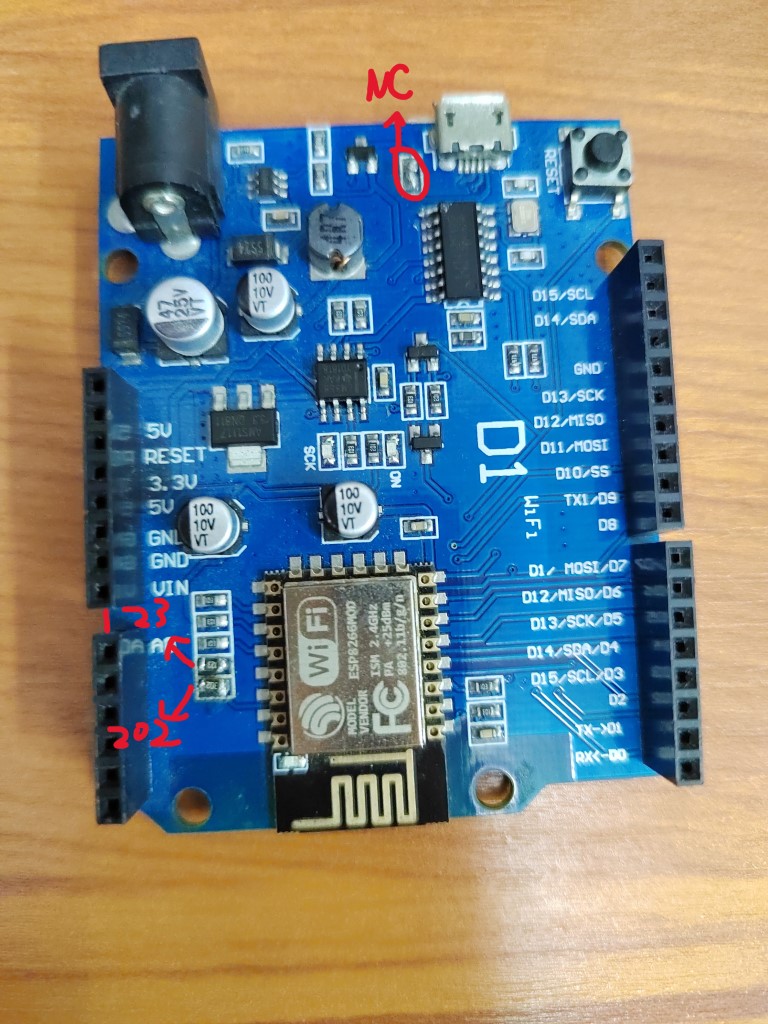
<p>Next is the voltage level issue for the power LED. It's a 5V push-pull output, so we need voltage division. On this board, the A0 interface has a voltage divider circuit. The ESP8266 receives only 1V. The original design used 104 and 224 resistors to divide 3.3V to 1V. We simply changed it to use 202 and 123 resistors to divide 5V.</p>
<p>Modification shown below:</p>
<figure><img src="https://imgcdn0.octz.net/blog/2025/IMG_20250120_231421.jpg" alt="Board Modification" tabindex="0" loading="lazy"><figcaption>Board Modification</figcaption></figure>
<p>Next, we can allocate the IO pins:</p>
<table>
<thead>
<tr>
<th style="text-align:center">ESP8266</th>
<th style="text-align:center">Function</th>
</tr>
</thead>
<tbody>
<tr>
<td style="text-align:center">D0 D1 (3 1)</td>
<td style="text-align:center">Serial Console</td>
</tr>
<tr>
<td style="text-align:center">TX1 (2)</td>
<td style="text-align:center">Debug Logger</td>
</tr>
<tr>
<td style="text-align:center">SCK (14)</td>
<td style="text-align:center">To PWR_BTN</td>
</tr>
<tr>
<td style="text-align:center">MISO (12)</td>
<td style="text-align:center">To RST_BTN</td>
</tr>
<tr>
<td style="text-align:center">A0 (17)</td>
<td style="text-align:center">From PWR_LED</td>
</tr>
<tr>
<td style="text-align:center">MOSI SS (13 15)</td>
<td style="text-align:center">To COM_Debug</td>
</tr>
</tbody>
</table>
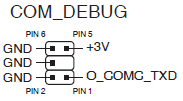
<p>Also, some ASUS motherboards define COM_Debug like this:</p>
<figure><img src="https://imgcdn0.octz.net/blog/2025/COM_DEBUG_ASUS.png" alt="COM_DEBUG ASUS" tabindex="0" loading="lazy"><figcaption>COM_DEBUG ASUS</figcaption></figure>
<p>After testing, my motherboard happened to match this definition :smile</p>
<div class="hint-container warning">
<p class="hint-container-title">Warning</p>
<p>Standard COM ports on motherboards typically follow the RS232 specification, which means their voltage levels are incompatible with TTL levels. In that case, you'll need a level conversion chip.</p>
</div>
<h2>Software Design</h2>
<h3>Interface and Commands</h3>
<p>Port 23 is assigned for serial forwarding, and port 22 for the console.</p>
<p>Power control commands use # as prefix and $ as suffix, with the middle character being: R - short reset, P - long press power button, S - short press power button.</p>
<p>Then there's L to list all log files, and codes greater than 0x80 for reading logs by index.</p>
<p>D to enable/disable COM real-time output, M to get current status, V to get version info.</p>
<h3>Serial Forwarding</h3>
<p>Based on the WiFiToSerial example project, with minor modifications and wrapped in a class.</p>
<p>Since ESP8266 has only one usable receive serial port, we use the swap function to switch pins. When the serial console port connects, we cut off logging and map to USB serial; otherwise, we map to COM.</p>
<h3>Logging</h3>
<p>Based on LittleFS for chunked log files. The 3MB storage is divided into 64K chunks with over 90 files max, providing some limitation for single-character command reading. Due to LittleFS's power-loss safety design, we must periodically sync to ensure writes are visible. We also handle file size checking and deletion of old files at the same time.</p>
<h3>WiFi Management and Configuration</h3>
<p>Using the WiFiManager library for automatic WiFi connection and providing a Config Portal on failure. We also register a disconnect event handler to restart the ESP8266.</p>
<h2>Afterword</h2>
<p>During installation, I discovered that after the system boots, a longer power button press is needed to force shutdown. Also, the signal inside the all-metal chassis was too poor, requiring repositioning, such as near the front panel seams...</p>
<p>Source code available at <a href="https://github.com/dynamicloader/littlectl" target="_blank" rel="noopener noreferrer">repository</a>.</p>
]]></content>
    <author>
      <name>DynamicLoader</name>
      <uri>https://octz.net/en/</uri>
    </author>
    <category term="Embedded"/>
    <contributor>
      <name>DynamicLoader</name>
      <uri>https://octz.net/en/</uri>
    </contributor>
    <published>2025-01-20T00:00:00.000Z</published>
    <rights>Copyright by DynamicLoader</rights>
  </entry>
  <entry>
    <title type="text">LVM Cache Layer Recovery</title>
    <id>https://octz.net/en/blog/Note/lvm-cache-rec.html</id>
    <link href="https://octz.net/en/blog/Note/lvm-cache-rec.html"/>
    <updated>2026-02-04T04:52:50.000Z</updated>
    <summary type="html"><![CDATA[<p>Refer: <a href="https://serverfault.com/questions/932247/how-to-recover-a-cached-lvm-with-cache-on-ram-disk" target="_blank" rel="noopener noreferrer">https://serverfault.com/questions/932247/how-to-recover-a-cached-lvm-with-cache-on-ram-disk</a></p>
<ol>
<li>
<p>Insert a new disk, or create a loop device using memory (if it's not large enough, you're out of luck)</p>
</li>
<li>
<p>After lvm, execute the following to remove cache</p>
</li>
</ol>]]></summary>
    <content type="html"><![CDATA[<p>Refer: <a href="https://serverfault.com/questions/932247/how-to-recover-a-cached-lvm-with-cache-on-ram-disk" target="_blank" rel="noopener noreferrer">https://serverfault.com/questions/932247/how-to-recover-a-cached-lvm-with-cache-on-ram-disk</a></p>
<ol>
<li>
<p>Insert a new disk, or create a loop device using memory (if it's not large enough, you're out of luck)</p>
</li>
<li>
<p>After lvm, execute the following to remove cache</p>
</li>
</ol>
<div class="language- line-numbers-mode" data-highlighter="shiki" data-ext style="--shiki-light:#383A42;--shiki-dark:#abb2bf;--shiki-light-bg:#FAFAFA;--shiki-dark-bg:#282c34"><pre class="shiki shiki-themes one-light one-dark-pro vp-code"><code class="language-"><span class="line"><span>pvs</span></span>
<span class="line"><span>pvcreate --norestore --uuid &#x3C;uuid_of_pv>  /dev/loop0</span></span>
<span class="line"><span>lvchange -a y vg</span></span>
<span class="line"><span>lvconvert --uncache vg/lv</span></span></code></pre>
<div class="line-numbers" aria-hidden="true" style="counter-reset:line-number 0"><div class="line-number"></div><div class="line-number"></div><div class="line-number"></div><div class="line-number"></div></div></div><ol start="3">
<li>Remove the disk from vg, then delete the pv created for recovery, then <code>lvchange -ay lvroot</code></li>
<li>Repair the filesystem <code>fsck.ext4 /dev/mapper/vg0-lvroot</code></li>
<li>^D to exit shell and continue booting, should succeed</li>
</ol>
]]></content>
    <author>
      <name>DynamicLoader</name>
      <uri>https://octz.net/en/</uri>
    </author>
    <category term="Note"/>
    <contributor>
      <name>DynamicLoader</name>
      <uri>https://octz.net/en/</uri>
    </contributor>
    <published>2025-02-01T00:00:00.000Z</published>
    <rights>Copyright by DynamicLoader</rights>
  </entry>
  <entry>
    <title type="text">Application of NOLOAD in Custom Sections - CH573 HardFault Debugging Journal</title>
    <id>https://octz.net/en/blog/Embed/custom_ld.html</id>
    <link href="https://octz.net/en/blog/Embed/custom_ld.html"/>
    <updated>2026-01-03T08:10:22.000Z</updated>
    <summary type="html"><![CDATA[<h2>Preface</h2>
<p>I wanted to make a low-power composite macro keyboard and mouse, and I set my eyes on the CH571 chip. I quickly got a development board to work with.</p>
<p>According to the datasheet, the Data area is divided into 16K+2K, which can be powered off at low voltage. Since the RV32 stack grows downward, the original linker script directly placed the stack bottom at the end of RAM, which couldn't meet the requirements.</p>]]></summary>
    <content type="html"><![CDATA[<h2>Preface</h2>
<p>I wanted to make a low-power composite macro keyboard and mouse, and I set my eyes on the CH571 chip. I quickly got a development board to work with.</p>
<p>According to the datasheet, the Data area is divided into 16K+2K, which can be powered off at low voltage. Since the RV32 stack grows downward, the original linker script directly placed the stack bottom at the end of RAM, which couldn't meet the requirements.</p>
<h2>Starting the Modification</h2>
<h3>First, let's look at the original linker script</h3>
<div class="language-ld line-numbers-mode" data-highlighter="shiki" data-ext="ld" style="--shiki-light:#383A42;--shiki-dark:#abb2bf;--shiki-light-bg:#FAFAFA;--shiki-dark-bg:#282c34"><pre class="shiki shiki-themes one-light one-dark-pro vp-code"><code class="language-ld"><span class="line"><span></span></span>
<span class="line"><span>ENTRY( _start )</span></span>
<span class="line"><span></span></span>
<span class="line"><span>MEMORY</span></span>
<span class="line"><span>{</span></span>
<span class="line"><span>	FLASH (rx) : ORIGIN = 0x00000000, LENGTH = 448K</span></span>
<span class="line"><span>	RAM (xrw) : ORIGIN = 0x20003800, LENGTH = 18K</span></span>
<span class="line"><span>}</span></span>
<span class="line"><span></span></span>
<span class="line"><span>SECTIONS</span></span>
<span class="line"><span>{</span></span>
<span class="line"><span></span></span>
<span class="line"><span>    /* 省略 */</span></span>
<span class="line"><span></span></span>
<span class="line"><span>	.stack ORIGIN(RAM)+LENGTH(RAM) :</span></span>
<span class="line"><span>	{</span></span>
<span class="line"><span>		. = ALIGN(4);</span></span>
<span class="line"><span>		PROVIDE(_eusrstack = . );</span></span>
<span class="line"><span>	} >RAM  </span></span>
<span class="line"><span></span></span>
<span class="line"><span>}</span></span></code></pre>
<div class="line-numbers" aria-hidden="true" style="counter-reset:line-number 0"><div class="line-number"></div><div class="line-number"></div><div class="line-number"></div><div class="line-number"></div><div class="line-number"></div><div class="line-number"></div><div class="line-number"></div><div class="line-number"></div><div class="line-number"></div><div class="line-number"></div><div class="line-number"></div><div class="line-number"></div><div class="line-number"></div><div class="line-number"></div><div class="line-number"></div><div class="line-number"></div><div class="line-number"></div><div class="line-number"></div><div class="line-number"></div><div class="line-number"></div><div class="line-number"></div></div></div><h3>Let's modify</h3>
<p>Since we need to place specified data at the last 2K location, it's natural to define a custom section, which I'll call (.lram), and specify its address.</p>
<p>Modified linker script:</p>
<div class="language-ld line-numbers-mode" data-highlighter="shiki" data-ext="ld" style="--shiki-light:#383A42;--shiki-dark:#abb2bf;--shiki-light-bg:#FAFAFA;--shiki-dark-bg:#282c34"><pre class="shiki shiki-themes one-light one-dark-pro vp-code"><code class="language-ld"><span class="line"><span></span></span>
<span class="line"><span>ENTRY( _start )</span></span>
<span class="line"><span></span></span>
<span class="line"><span>__lram_size = 256;</span></span>
<span class="line"><span></span></span>
<span class="line"><span>MEMORY</span></span>
<span class="line"><span>{</span></span>
<span class="line"><span>	FLASH (rx) : ORIGIN = 0x00000000, LENGTH = 448K</span></span>
<span class="line"><span>	RAM (xrw) : ORIGIN = 0x20003800, LENGTH = 18K</span></span>
<span class="line"><span>}</span></span>
<span class="line"><span></span></span>
<span class="line"><span>SECTIONS</span></span>
<span class="line"><span>{</span></span>
<span class="line"><span></span></span>
<span class="line"><span>    /* omitted */</span></span>
<span class="line"><span></span></span>
<span class="line"><span>	.stack ORIGIN(RAM)+LENGTH(RAM) - __lram_size :</span></span>
<span class="line"><span>	{</span></span>
<span class="line"><span>		. = ALIGN(4);</span></span>
<span class="line"><span>		PROVIDE(_eusrstack = . );</span></span>
<span class="line"><span>	} >RAM  </span></span>
<span class="line"><span>	</span></span>
<span class="line"><span>	.lram ORIGIN(RAM)+LENGTH(RAM) - __lram_size  :</span></span>
<span class="line"><span>	{</span></span>
<span class="line"><span>		. = ALIGN(4);</span></span>
<span class="line"><span>		*(.lram);</span></span>
<span class="line"><span>		*(.lram.*);</span></span>
<span class="line"><span>		. = ALIGN(4);</span></span>
<span class="line"><span>	} > RAM </span></span>
<span class="line"><span></span></span>
<span class="line"><span>}</span></span></code></pre>
<div class="line-numbers" aria-hidden="true" style="counter-reset:line-number 0"><div class="line-number"></div><div class="line-number"></div><div class="line-number"></div><div class="line-number"></div><div class="line-number"></div><div class="line-number"></div><div class="line-number"></div><div class="line-number"></div><div class="line-number"></div><div class="line-number"></div><div class="line-number"></div><div class="line-number"></div><div class="line-number"></div><div class="line-number"></div><div class="line-number"></div><div class="line-number"></div><div class="line-number"></div><div class="line-number"></div><div class="line-number"></div><div class="line-number"></div><div class="line-number"></div><div class="line-number"></div><div class="line-number"></div><div class="line-number"></div><div class="line-number"></div><div class="line-number"></div><div class="line-number"></div><div class="line-number"></div><div class="line-number"></div><div class="line-number"></div><div class="line-number"></div></div></div><p>After defining it, define a structure in the source code and add the attribute according to GCC specifications, like this:</p>
<div class="language-c line-numbers-mode" data-highlighter="shiki" data-ext="c" style="--shiki-light:#383A42;--shiki-dark:#abb2bf;--shiki-light-bg:#FAFAFA;--shiki-dark-bg:#282c34"><pre class="shiki shiki-themes one-light one-dark-pro vp-code"><code class="language-c"><span class="line"></span>
<span class="line"><span style="--shiki-light:#A626A4;--shiki-dark:#C678DD">typedef</span><span style="--shiki-light:#A626A4;--shiki-dark:#C678DD"> struct</span><span style="--shiki-light:#383A42;--shiki-dark:#ABB2BF"> {</span></span>
<span class="line"><span style="--shiki-light:#A626A4;--shiki-dark:#C678DD">    uint32_t</span><span style="--shiki-light:#383A42;--shiki-dark:#ABB2BF"> passCode;</span></span>
<span class="line"><span style="--shiki-light:#A626A4;--shiki-dark:#C678DD">    uint8_t</span><span style="--shiki-light:#E45649;--shiki-dark:#E06C75"> rsv</span><span style="--shiki-light:#383A42;--shiki-dark:#ABB2BF">[</span><span style="--shiki-light:#986801;--shiki-dark:#D19A66">236</span><span style="--shiki-light:#383A42;--shiki-dark:#ABB2BF">];</span></span>
<span class="line"></span>
<span class="line"><span style="--shiki-light:#383A42;--shiki-dark:#ABB2BF">} </span><span style="--shiki-light:#0184BC;--shiki-dark:#56B6C2">globalVar_t</span><span style="--shiki-light:#383A42;--shiki-dark:#ABB2BF">, </span><span style="--shiki-light:#A626A4;--shiki-dark:#C678DD">*</span><span style="--shiki-light:#0184BC;--shiki-dark:#56B6C2">pglobalVar_t</span><span style="--shiki-light:#383A42;--shiki-dark:#ABB2BF">;</span><span style="--shiki-light:#A0A1A7;--shiki-light-font-style:italic;--shiki-dark:#7F848E;--shiki-dark-font-style:italic"> // 256 Bytes max</span></span>
<span class="line"></span>
<span class="line"><span style="--shiki-light:#4078F2;--shiki-dark:#61AFEF">__attribute__</span><span style="--shiki-light:#383A42;--shiki-dark:#ABB2BF">((</span><span style="--shiki-light:#4078F2;--shiki-dark:#61AFEF">section</span><span style="--shiki-light:#383A42;--shiki-dark:#ABB2BF">(</span><span style="--shiki-light:#50A14F;--shiki-dark:#98C379">".lram"</span><span style="--shiki-light:#383A42;--shiki-dark:#ABB2BF">)))</span></span>
<span class="line"><span style="--shiki-light:#0184BC;--shiki-dark:#56B6C2">globalVar_t</span><span style="--shiki-light:#383A42;--shiki-dark:#ABB2BF"> globalVar;</span></span></code></pre>
<div class="line-numbers" aria-hidden="true" style="counter-reset:line-number 0"><div class="line-number"></div><div class="line-number"></div><div class="line-number"></div><div class="line-number"></div><div class="line-number"></div><div class="line-number"></div><div class="line-number"></div><div class="line-number"></div><div class="line-number"></div></div></div><p>After compiling successfully, I flashed it to the board using WCHISPStudio <strong>3.40</strong> and got a project that keeps rebooting with the indication that the reason is RPOR (real power-on reset).</p>
<h2>Debugging the Issue</h2>
<h3>Searching High and Low</h3>
<p>At first, I suspected the stack was corrupted, and I moved the stack address forward by 4 bytes, which fixed it. However, something still felt wrong</p>
]]></content>
    <author>
      <name>DynamicLoader</name>
      <uri>https://octz.net/en/</uri>
    </author>
    <category term="Embedded"/>
    <contributor>
      <name>DynamicLoader</name>
      <uri>https://octz.net/en/</uri>
    </contributor>
    <published>2023-08-24T00:00:00.000Z</published>
    <rights>Copyright by DynamicLoader</rights>
  </entry>
  <entry>
    <title type="text">ESP-IDF and VSCode Plugin Installation and Configuration in WSL</title>
    <id>https://octz.net/en/blog/Embed/ESPIDF-WSL.html</id>
    <link href="https://octz.net/en/blog/Embed/ESPIDF-WSL.html"/>
    <updated>2026-01-03T08:10:22.000Z</updated>
    <summary type="html"><![CDATA[<h2>Preface</h2>
<p>As we all know, installing ESP-IDF on Windows is quite difficult with extremely slow compilation speed. Usually, compiling a HelloWorld program takes 5 minutes or more.<br>
However, in practice, ESP-IDF on Linux (WSL) has extremely fast compilation speed. The same HelloWorld program can be compiled in just 10 seconds.</p>]]></summary>
    <content type="html"><![CDATA[<h2>Preface</h2>
<p>As we all know, installing ESP-IDF on Windows is quite difficult with extremely slow compilation speed. Usually, compiling a HelloWorld program takes 5 minutes or more.<br>
However, in practice, ESP-IDF on Linux (WSL) has extremely fast compilation speed. The same HelloWorld program can be compiled in just 10 seconds.</p>
<p>This article mainly introduces the steps for installing ESP-IDF and its VSCode plugin on WSL.</p>
<h2>Setting Up Windows Environment</h2>
<h3>Install Required Software</h3>
<p>Required software on Windows:</p>
<ul>
<li>Visual Studio Code</li>
<li>WSL 2</li>
<li>WSL Ubuntu Distribution (Microsoft Store)</li>
<li>Python 3.9</li>
</ul>
<div class="hint-container tip">
<p class="hint-container-title">Note</p>
<ul>
<li>WSL is only available on Windows 10+, users on older Windows versions should use a virtual machine!</li>
<li>WSL Ubuntu version should be 20.04+, this article uses version 22.04.</li>
</ul>
</div>
<h3>Configure WSL</h3>
<p>Open a WSL window and execute the following commands to install required packages:</p>
<div class="language-bash line-numbers-mode" data-highlighter="shiki" data-ext="bash" style="--shiki-light:#383A42;--shiki-dark:#abb2bf;--shiki-light-bg:#FAFAFA;--shiki-dark-bg:#282c34"><pre class="shiki shiki-themes one-light one-dark-pro vp-code"><code class="language-bash"><span class="line"><span style="--shiki-light:#4078F2;--shiki-dark:#61AFEF">sudo</span><span style="--shiki-light:#50A14F;--shiki-dark:#98C379"> apt</span><span style="--shiki-light:#50A14F;--shiki-dark:#98C379"> update</span></span>
<span class="line"><span style="--shiki-light:#4078F2;--shiki-dark:#61AFEF">sudo</span><span style="--shiki-light:#50A14F;--shiki-dark:#98C379"> apt-get</span><span style="--shiki-light:#50A14F;--shiki-dark:#98C379"> install</span><span style="--shiki-light:#50A14F;--shiki-dark:#98C379"> git</span><span style="--shiki-light:#50A14F;--shiki-dark:#98C379"> wget</span><span style="--shiki-light:#50A14F;--shiki-dark:#98C379"> flex</span><span style="--shiki-light:#50A14F;--shiki-dark:#98C379"> bison</span><span style="--shiki-light:#50A14F;--shiki-dark:#98C379"> gperf</span><span style="--shiki-light:#50A14F;--shiki-dark:#98C379"> python3-pip</span><span style="--shiki-light:#50A14F;--shiki-dark:#98C379"> python3-venv</span><span style="--shiki-light:#50A14F;--shiki-dark:#98C379"> python3-setuptools</span><span style="--shiki-light:#50A14F;--shiki-dark:#98C379"> cmake</span><span style="--shiki-light:#50A14F;--shiki-dark:#98C379"> ninja-build</span><span style="--shiki-light:#50A14F;--shiki-dark:#98C379"> ccache</span><span style="--shiki-light:#50A14F;--shiki-dark:#98C379"> libffi-dev</span><span style="--shiki-light:#50A14F;--shiki-dark:#98C379"> libssl-dev</span><span style="--shiki-light:#50A14F;--shiki-dark:#98C379"> dfu-util</span></span></code></pre>
<div class="line-numbers" aria-hidden="true" style="counter-reset:line-number 0"><div class="line-number"></div><div class="line-number"></div></div></div><h3>Configure VSCode</h3>
<ol>
<li>
<p>Manually install <code>Remote - WSL</code> from the VSCode Extensions interface (Extension ID: <code>ms-vscode-remote.remote-wsl</code>);</p>
</li>
<li>
<p>Click the green icon in the bottom left corner of VSCode to bring up a similar page, select <code>New WSL Window</code>. A new VSCode window should open, and the green icon in the bottom left should change to <code>WSL:Ubuntu-22.04</code>;<br>
<img src="https://imgcdn0.octz.net/blog/2023/WSL-1.png" alt="WSL-1" loading="lazy"></p>
</li>
<li>
<p>In the newly opened window, find the Extensions page, search for <code>Espressif IDF</code>, and click the <code>Install in WSL:Ubuntu-22.04</code> button as shown in the image, then wait for installation to complete;<br>
<img src="https://imgcdn0.octz.net/blog/2023/WSL-2.png" alt="WSL-2" loading="lazy"></p>
</li>
<li>
<p>After installation is complete, follow the instructions shown in the images to select the download source, change the installation path, click [Install], and continue waiting;<br>
<img src="https://imgcdn0.octz.net/blog/2023/WSL-3.png" alt="WSL-3" loading="lazy"></p>
</li>
</ol>
<h3>Patch ESP-IDF</h3>
<p>In practice, at this point we can compile at ultra-fast speed, but we still cannot flash the program. According to the official documentation, we need to install usbipd to map the serial port, but this will encounter permission issues.</p>
<p>Here we utilize a magical feature (bug) of IDF: when flashing, the local PowerShell.exe is called, and naturally, the Python called is also local.<br>
Therefore, we only need to install the corresponding dependencies locally to perfectly solve the problem. Steps:</p>
<ol>
<li>Copy the corresponding files from WSL Ubuntu or <a href="/files/esp-idf-wsl-patch.zip">download</a></li>
</ol>
<ul>
<li>${IDF_PATH}/requirements.txt</li>
<li>${IDF_PATH}/tools/kconfig_new/esp-windows-curses</li>
</ul>
<div class="hint-container tip">
<p class="hint-container-title">Tip</p>
<p>Place the copied <code>requirements.txt</code> and <code>esp-windows-curses</code> folder in the same directory.</p>
</div>
<p>Modify <code>requirements.txt</code>, change the following line (usually at the end)</p>
<div class="language- line-numbers-mode" data-highlighter="shiki" data-ext style="--shiki-light:#383A42;--shiki-dark:#abb2bf;--shiki-light-bg:#FAFAFA;--shiki-dark-bg:#282c34"><pre class="shiki shiki-themes one-light one-dark-pro vp-code"><code class="language-"><span class="line"><span>file://${IDF_PATH}/tools/kconfig_new/esp-windows-curses; sys_platform == 'win32'</span></span></code></pre>
<div class="line-numbers" aria-hidden="true" style="counter-reset:line-number 0"><div class="line-number"></div></div></div><p>to</p>
<div class="language- line-numbers-mode" data-highlighter="shiki" data-ext style="--shiki-light:#383A42;--shiki-dark:#abb2bf;--shiki-light-bg:#FAFAFA;--shiki-dark-bg:#282c34"><pre class="shiki shiki-themes one-light one-dark-pro vp-code"><code class="language-"><span class="line"><span>./esp-windows-curses; sys_platform == 'win32'</span></span></code></pre>
<div class="line-numbers" aria-hidden="true" style="counter-reset:line-number 0"><div class="line-number"></div></div></div><p>Then open Windows Terminal (whichever you prefer), navigate to the saved file directory, and execute</p>
<div class="language-powershell line-numbers-mode" data-highlighter="shiki" data-ext="powershell" style="--shiki-light:#383A42;--shiki-dark:#abb2bf;--shiki-light-bg:#FAFAFA;--shiki-dark-bg:#282c34"><pre class="shiki shiki-themes one-light one-dark-pro vp-code"><code class="language-powershell"><span class="line"><span style="--shiki-light:#383A42;--shiki-dark:#ABB2BF">pip install </span><span style="--shiki-light:#383A42;--shiki-dark:#56B6C2">-</span><span style="--shiki-light:#383A42;--shiki-dark:#ABB2BF">r requirements.txt</span></span></code></pre>
<div class="line-numbers" aria-hidden="true" style="counter-reset:line-number 0"><div class="line-number"></div></div></div><p>Wait a moment for the installation to complete. (If unsuccessful, try changing the package source)</p>
<h2>Testing ESP-IDF Functionality</h2>
<p>Open a folder in the VSCode window connected to WSL.<br>
Press <code>Ctrl + E</code>, then press <code>C</code>, select <code>Use current directory</code>, and you can create an IDF project using a template.<br>
Next, connect your development board, select the serial port in the bottom bar at [/dev/ttyUSB1]; then compile and flash (click the 🔥 icon to do both in one step)</p>
<p>After a moment, you will be able to see logs from the serial port monitor!</p>
<h2>All Done!</h2>
<p>Now you can enjoy blazingly fast 10-second compilation and flashing!</p>
]]></content>
    <author>
      <name>DynamicLoader</name>
      <uri>https://octz.net/en/</uri>
    </author>
    <category term="Embedded"/>
    <contributor>
      <name>DynamicLoader</name>
      <uri>https://octz.net/en/</uri>
    </contributor>
    <published>2022-07-22T00:00:00.000Z</published>
    <rights>Copyright by DynamicLoader</rights>
  </entry>
  <entry>
    <title type="text">Simulated Keyboard and Mouse Design Based on CH551/CH552G</title>
    <id>https://octz.net/en/blog/Embed/SoftKeyMouse.html</id>
    <link href="https://octz.net/en/blog/Embed/SoftKeyMouse.html"/>
    <updated>2026-01-03T08:10:22.000Z</updated>
    <summary type="html"><![CDATA[<h2>Preface</h2>
<p>This month I suddenly had the idea to make a keyboard and mouse simulator, so I went to the familiar <a href="https://wch.cn" target="_blank" rel="noopener noreferrer">WCH website</a> and found the CH552G and CH340K.<br>
Without further ado, let's get started. (At this time I didn't realize I was stepping into a big pit, because there's already a ready-made CH9326 chip)</p>]]></summary>
    <content type="html"><![CDATA[<h2>Preface</h2>
<p>This month I suddenly had the idea to make a keyboard and mouse simulator, so I went to the familiar <a href="https://wch.cn" target="_blank" rel="noopener noreferrer">WCH website</a> and found the CH552G and CH340K.<br>
Without further ado, let's get started. (At this time I didn't realize I was stepping into a big pit, because there's already a ready-made CH9326 chip)</p>
<h2>Schematic Design &amp; PCB Design</h2>
<p>First, let's look at the schematic:<br>
<img src="https://imgcdn0.octz.net/blog/2023/softKM-1.png" alt="Schematic" loading="lazy"></p>
<p>The overall idea is to use CH340K as a USB-to-serial converter to connect with CH552, where CH552 emulates an HID device and sends HID packets to the controlled host according to commands received on serial port 0, completing the simulated operations.<br>
In the diagram, I connected the serial port RTS and DTR to the interrupt pins of CH552 for flow control. SRV05 is an ESD protection chip. (Why did I only think about this when winter came...)</p>
<p>As for the PCB, I quickly drew a two-layer board and sent it to JLC for prototyping. (Then I got into trouble soldering the MicroUSB connector)</p>
<h2>Firmware Development: Not yet successfully soldered, lacking motivation</h2>
]]></content>
    <author>
      <name>DynamicLoader</name>
      <uri>https://octz.net/en/</uri>
    </author>
    <category term="Embedded"/>
    <contributor>
      <name>DynamicLoader</name>
      <uri>https://octz.net/en/</uri>
    </contributor>
    <published>2022-10-23T00:00:00.000Z</published>
    <rights>Copyright by DynamicLoader</rights>
  </entry>
  <entry>
    <title type="text">Generate and Embed Resource Files with GCC Toolchain</title>
    <id>https://octz.net/en/blog/Programming/gccResource.html</id>
    <link href="https://octz.net/en/blog/Programming/gccResource.html"/>
    <updated>2026-01-03T08:10:22.000Z</updated>
    <summary type="html"><![CDATA[<h2>Introduction</h2>
<p>As we all know, resource files play an indispensable role in program execution. However, to achieve cross-platform resource file utilization, we must abandon Win32 resource files. This article introduces a method for generating and embedding resource files using the (MinGW) GCC toolchain.</p>]]></summary>
    <content type="html"><![CDATA[<h2>Introduction</h2>
<p>As we all know, resource files play an indispensable role in program execution. However, to achieve cross-platform resource file utilization, we must abandon Win32 resource files. This article introduces a method for generating and embedding resource files using the (MinGW) GCC toolchain.</p>
<h2>Step 1: Generate Resource Object Files Using ld</h2>
<p>In this step, we will use the linker (ld) to generate the resource object file (.o) we need.</p>
<h3>Prepare Resource Files</h3>
<p>Resource files can be in any format, including but not limited to images and text files. Here we use two text documents as examples:</p>
<p>File: a.txt</p>
<div class="language- line-numbers-mode" data-highlighter="shiki" data-ext style="--shiki-light:#383A42;--shiki-dark:#abb2bf;--shiki-light-bg:#FAFAFA;--shiki-dark-bg:#282c34"><pre class="shiki shiki-themes one-light one-dark-pro vp-code"><code class="language-"><span class="line"><span>dawdawwdwkjagcbsfgbcfgfjbkajkaadgad</span></span></code></pre>
<div class="line-numbers" aria-hidden="true" style="counter-reset:line-number 0"><div class="line-number"></div></div></div><p>File: b.txt</p>
<div class="language- line-numbers-mode" data-highlighter="shiki" data-ext style="--shiki-light:#383A42;--shiki-dark:#abb2bf;--shiki-light-bg:#FAFAFA;--shiki-dark-bg:#282c34"><pre class="shiki shiki-themes one-light one-dark-pro vp-code"><code class="language-"><span class="line"><span>Hello,txt1!</span></span></code></pre>
<div class="line-numbers" aria-hidden="true" style="counter-reset:line-number 0"><div class="line-number"></div></div></div><h3>Generate Resource Object File</h3>
<p>Open CMD in the folder containing the resource files and execute:</p>
<div class="language-batch line-numbers-mode" data-highlighter="shiki" data-ext="batch" style="--shiki-light:#383A42;--shiki-dark:#abb2bf;--shiki-light-bg:#FAFAFA;--shiki-dark-bg:#282c34"><pre class="shiki shiki-themes one-light one-dark-pro vp-code"><code class="language-batch"><span class="line"><span style="--shiki-light:#383A42;--shiki-dark:#ABB2BF">ld -r -b binary a.txt b.txt -o res.o</span></span></code></pre>
<div class="line-numbers" aria-hidden="true" style="counter-reset:line-number 0"><div class="line-number"></div></div></div><div class="hint-container tip">
<p class="hint-container-title">Tip</p>
<p>The command template is: <code>ld -r -b binary {file1} {file2} -o {output file path}</code>; wildcards are available.</p>
</div>
<p>Thus, we obtain the resource object file <code>res.o</code>.</p>
<h3>Check Resource Object File Symbols (Optional)</h3>
<p>To ensure successful compilation, we can first check the symbols exposed by the resource file to understand the naming pattern.</p>
<p>Execute in the CMD:</p>
<div class="language-batch line-numbers-mode" data-highlighter="shiki" data-ext="batch" style="--shiki-light:#383A42;--shiki-dark:#abb2bf;--shiki-light-bg:#FAFAFA;--shiki-dark-bg:#282c34"><pre class="shiki shiki-themes one-light one-dark-pro vp-code"><code class="language-batch"><span class="line"><span style="--shiki-light:#383A42;--shiki-dark:#ABB2BF">objdump -x res.o</span></span></code></pre>
<div class="line-numbers" aria-hidden="true" style="counter-reset:line-number 0"><div class="line-number"></div></div></div><p>We get a large amount of output. At the end of the output, there is a table similar to:</p>
<div class="language- line-numbers-mode" data-highlighter="shiki" data-ext style="--shiki-light:#383A42;--shiki-dark:#abb2bf;--shiki-light-bg:#FAFAFA;--shiki-dark-bg:#282c34"><pre class="shiki shiki-themes one-light one-dark-pro vp-code"><code class="language-"><span class="line"><span>SYMBOL TABLE:</span></span>
<span class="line"><span>[  0](sec -1)(fl 0x00)(ty   0)(scl   2) (nx 0) 0x0000000000000023 _binary_a_txt_size</span></span>
<span class="line"><span>[  1](sec -1)(fl 0x00)(ty   0)(scl   2) (nx 0) 0x000000000000000b _binary_b_txt_size</span></span>
<span class="line"><span>[  2](sec  1)(fl 0x00)(ty   0)(scl   2) (nx 0) 0x000000000000002e _binary_b_txt_end</span></span>
<span class="line"><span>[  3](sec  1)(fl 0x00)(ty   0)(scl   2) (nx 0) 0x0000000000000023 _binary_b_txt_start</span></span>
<span class="line"><span>[  4](sec  1)(fl 0x00)(ty   0)(scl   2) (nx 0) 0x0000000000000023 _binary_a_txt_end</span></span>
<span class="line"><span>[  5](sec  1)(fl 0x00)(ty   0)(scl   2) (nx 0) 0x0000000000000000 _binary_a_txt_start</span></span></code></pre>
<div class="line-numbers" aria-hidden="true" style="counter-reset:line-number 0"><div class="line-number"></div><div class="line-number"></div><div class="line-number"></div><div class="line-number"></div><div class="line-number"></div><div class="line-number"></div><div class="line-number"></div></div></div><p>This shows that our text documents are embedded in the resource object file, generating several symbols. We can summarize the pattern:</p>
<div class="hint-container note">
<p class="hint-container-title">Symbol Naming Pattern</p>
<p>_binary_filename_start<br><br>
_binary_filename_end<br><br>
_binary_filename_size</p>
<div style="text-align:right">
<p>Note: The <code>.</code> in filenames is replaced with <code>_</code>.</p>
</div>
</div>
<h2>Step 2: Write Test Code</h2>
<h3>Importing Symbols</h3>
<p>Our ultimate goal is to embed the resource file into the executable and use it in the program. To achieve this, we need to import symbols in the source file, for example:</p>
<div class="language-cpp line-numbers-mode" data-highlighter="shiki" data-ext="cpp" style="--shiki-light:#383A42;--shiki-dark:#abb2bf;--shiki-light-bg:#FAFAFA;--shiki-dark-bg:#282c34"><pre class="shiki shiki-themes one-light one-dark-pro vp-code"><code class="language-cpp"><span class="line"><span style="--shiki-light:#A626A4;--shiki-dark:#C678DD">extern</span><span style="--shiki-light:#A626A4;--shiki-dark:#C678DD"> const</span><span style="--shiki-light:#A626A4;--shiki-dark:#C678DD"> char</span><span style="--shiki-light:#383A42;--shiki-dark:#ABB2BF"> _binary_a_txt_start[], _binary_a_txt_end[];</span></span>
<span class="line"><span style="--shiki-light:#A626A4;--shiki-dark:#C678DD">extern</span><span style="--shiki-light:#A626A4;--shiki-dark:#C678DD"> const</span><span style="--shiki-light:#A626A4;--shiki-dark:#C678DD"> char</span><span style="--shiki-light:#383A42;--shiki-dark:#ABB2BF"> _binary_b_txt_start[], _binary_b_txt_end[];</span></span></code></pre>
<div class="line-numbers" aria-hidden="true" style="counter-reset:line-number 0"><div class="line-number"></div><div class="line-number"></div></div></div><p>By using the <code>extern</code> keyword and copying the symbol names, we can import symbols into our source code.</p>
<div class="hint-container warning">
<p class="hint-container-title">Important Note</p>
<p>Symbols are addresses and should be defined as const char[] type.</p>
</div>
<h3>Using Symbols</h3>
<p>For example:</p>
<div class="language-cpp line-numbers-mode" data-highlighter="shiki" data-ext="cpp" style="--shiki-light:#383A42;--shiki-dark:#abb2bf;--shiki-light-bg:#FAFAFA;--shiki-dark-bg:#282c34"><pre class="shiki shiki-themes one-light one-dark-pro vp-code"><code class="language-cpp"><span class="line"><span style="--shiki-light:#A626A4;--shiki-dark:#C678DD">int</span><span style="--shiki-light:#4078F2;--shiki-dark:#61AFEF"> main</span><span style="--shiki-light:#383A42;--shiki-dark:#ABB2BF">(){</span></span>
<span class="line"><span style="--shiki-light:#A626A4;--shiki-dark:#C678DD">    size_t</span><span style="--shiki-light:#383A42;--shiki-dark:#ABB2BF"> a_len </span><span style="--shiki-light:#A626A4;--shiki-dark:#C678DD">=</span><span style="--shiki-light:#383A42;--shiki-dark:#ABB2BF"> _binary_a_txt_end </span><span style="--shiki-light:#A626A4;--shiki-dark:#C678DD">-</span><span style="--shiki-light:#383A42;--shiki-dark:#ABB2BF"> _binary_a_txt_start;</span></span>
<span class="line"><span style="--shiki-light:#A626A4;--shiki-dark:#C678DD">    size_t</span><span style="--shiki-light:#383A42;--shiki-dark:#ABB2BF"> b_len </span><span style="--shiki-light:#A626A4;--shiki-dark:#C678DD">=</span><span style="--shiki-light:#383A42;--shiki-dark:#ABB2BF"> _binary_b_txt_end </span><span style="--shiki-light:#A626A4;--shiki-dark:#C678DD">-</span><span style="--shiki-light:#383A42;--shiki-dark:#ABB2BF"> _binary_b_txt_start;</span></span>
<span class="line"><span style="--shiki-light:#4078F2;--shiki-dark:#61AFEF">    printf</span><span style="--shiki-light:#383A42;--shiki-dark:#ABB2BF">(</span><span style="--shiki-light:#50A14F;--shiki-dark:#98C379">"a.txt len=</span><span style="--shiki-light:#986801;--shiki-dark:#D19A66">%u</span><span style="--shiki-light:#50A14F;--shiki-dark:#98C379">,content= </span><span style="--shiki-light:#986801;--shiki-dark:#D19A66">%.*s</span><span style="--shiki-light:#0184BC;--shiki-dark:#56B6C2">\n</span><span style="--shiki-light:#50A14F;--shiki-dark:#98C379">"</span><span style="--shiki-light:#383A42;--shiki-dark:#ABB2BF">, a_len, a_len, _binary_a_txt_start );</span></span>
<span class="line"><span style="--shiki-light:#4078F2;--shiki-dark:#61AFEF">    printf</span><span style="--shiki-light:#383A42;--shiki-dark:#ABB2BF">(</span><span style="--shiki-light:#50A14F;--shiki-dark:#98C379">"b.txt len=</span><span style="--shiki-light:#986801;--shiki-dark:#D19A66">%u</span><span style="--shiki-light:#50A14F;--shiki-dark:#98C379">,content= </span><span style="--shiki-light:#986801;--shiki-dark:#D19A66">%.*s</span><span style="--shiki-light:#0184BC;--shiki-dark:#56B6C2">\n</span><span style="--shiki-light:#50A14F;--shiki-dark:#98C379">"</span><span style="--shiki-light:#383A42;--shiki-dark:#ABB2BF">, b_len, b_len, _binary_b_txt_start );</span></span>
<span class="line"><span style="--shiki-light:#A626A4;--shiki-dark:#C678DD">    return</span><span style="--shiki-light:#986801;--shiki-dark:#D19A66"> 0</span><span style="--shiki-light:#383A42;--shiki-dark:#ABB2BF">;</span></span>
<span class="line"><span style="--shiki-light:#383A42;--shiki-dark:#ABB2BF">}</span></span></code></pre>
<div class="line-numbers" aria-hidden="true" style="counter-reset:line-number 0"><div class="line-number"></div><div class="line-number"></div><div class="line-number"></div><div class="line-number"></div><div class="line-number"></div><div class="line-number"></div><div class="line-number"></div></div></div><p>Save as test.cpp and compile:</p>
<div class="language-batch line-numbers-mode" data-highlighter="shiki" data-ext="batch" style="--shiki-light:#383A42;--shiki-dark:#abb2bf;--shiki-light-bg:#FAFAFA;--shiki-dark-bg:#282c34"><pre class="shiki shiki-themes one-light one-dark-pro vp-code"><code class="language-batch"><span class="line"><span style="--shiki-light:#383A42;--shiki-dark:#ABB2BF">g++ res.o test.cpp -o test.exe</span></span>
<span class="line"><span style="--shiki-light:#383A42;--shiki-dark:#ABB2BF">The executable file is now generated. The execution result should be:</span></span></code></pre>
<div class="line-numbers" aria-hidden="true" style="counter-reset:line-number 0"><div class="line-number"></div><div class="line-number"></div></div></div><p>a.txt len=35,content= dawdawwdwkjagcbsfgbcfgfjbkajkaadgad<br>
b.txt len=11,content= Hello,txt1!</p>
<div class="language- line-numbers-mode" data-highlighter="shiki" data-ext style="--shiki-light:#383A42;--shiki-dark:#abb2bf;--shiki-light-bg:#FAFAFA;--shiki-dark-bg:#282c34"><pre class="shiki shiki-themes one-light one-dark-pro vp-code"><code class="language-"><span class="line"><span></span></span>
<span class="line"><span>## Step 3: Encapsulate for Easy Use</span></span>
<span class="line"><span>Here we use GCC's macro expansion feature to write example encapsulation code:</span></span>
<span class="line"><span></span></span>
<span class="line"><span>File: customResource.hpp</span></span>
<span class="line"><span>```Cpp</span></span>
<span class="line"><span>#pragma once</span></span>
<span class="line"><span>#include &#x3C;cstdint></span></span>
<span class="line"><span></span></span>
<span class="line"><span>#define RESDEF(name) extern const char _binary_##name##_start[], _binary_##name##_end[]</span></span>
<span class="line"><span>#define RES(name) _binary_##name##_start, _binary_##name##_end</span></span>
<span class="line"><span></span></span>
<span class="line"><span>namespace Utils {</span></span>
<span class="line"><span>class Resource {</span></span>
<span class="line"><span>public:</span></span>
<span class="line"><span>    Resource(const char* begin, const char* end)</span></span>
<span class="line"><span>        : _begin(begin)</span></span>
<span class="line"><span>        , _end(end)</span></span>
<span class="line"><span>    {</span></span>
<span class="line"><span>    }</span></span>
<span class="line"><span>    ~Resource() { }</span></span>
<span class="line"><span>    const char* begin() { return this->_begin; }</span></span>
<span class="line"><span>    const char* end() { return this->_end; }</span></span>
<span class="line"><span>    size_t length() { return this->_end - this->_begin; }</span></span>
<span class="line"><span>    const uint8_t* data() { return (const uint8_t*)this->_begin; }</span></span>
<span class="line"><span></span></span>
<span class="line"><span>private:</span></span>
<span class="line"><span>    const char* _begin = nullptr;</span></span>
<span class="line"><span>    const char* _end = nullptr;</span></span>
<span class="line"><span>};</span></span>
<span class="line"><span></span></span>
<span class="line"><span>}</span></span></code></pre>
<div class="line-numbers" aria-hidden="true" style="counter-reset:line-number 0"><div class="line-number"></div><div class="line-number"></div><div class="line-number"></div><div class="line-number"></div><div class="line-number"></div><div class="line-number"></div><div class="line-number"></div><div class="line-number"></div><div class="line-number"></div><div class="line-number"></div><div class="line-number"></div><div class="line-number"></div><div class="line-number"></div><div class="line-number"></div><div class="line-number"></div><div class="line-number"></div><div class="line-number"></div><div class="line-number"></div><div class="line-number"></div><div class="line-number"></div><div class="line-number"></div><div class="line-number"></div><div class="line-number"></div><div class="line-number"></div><div class="line-number"></div><div class="line-number"></div><div class="line-number"></div><div class="line-number"></div><div class="line-number"></div><div class="line-number"></div><div class="line-number"></div><div class="line-number"></div></div></div><p>File: main.cpp</p>
<div class="language-cpp line-numbers-mode" data-highlighter="shiki" data-ext="cpp" style="--shiki-light:#383A42;--shiki-dark:#abb2bf;--shiki-light-bg:#FAFAFA;--shiki-dark-bg:#282c34"><pre class="shiki shiki-themes one-light one-dark-pro vp-code"><code class="language-cpp"><span class="line"><span style="--shiki-light:#A626A4;--shiki-dark:#C678DD">#include</span><span style="--shiki-light:#50A14F;--shiki-dark:#98C379"> &#x3C;cstdio></span></span>
<span class="line"><span style="--shiki-light:#A626A4;--shiki-dark:#C678DD">#include</span><span style="--shiki-light:#50A14F;--shiki-dark:#98C379"> "customResource.hpp"</span></span>
<span class="line"></span>
<span class="line"><span style="--shiki-light:#A626A4;--shiki-dark:#C678DD">using</span><span style="--shiki-light:#A626A4;--shiki-dark:#C678DD"> namespace</span><span style="--shiki-light:#383A42;--shiki-dark:#E5C07B"> Utils</span><span style="--shiki-light:#383A42;--shiki-dark:#ABB2BF">;</span></span>
<span class="line"></span>
<span class="line"><span style="--shiki-light:#4078F2;--shiki-dark:#61AFEF">RESDEF</span><span style="--shiki-light:#383A42;--shiki-dark:#ABB2BF">(a_txt);</span></span>
<span class="line"><span style="--shiki-light:#4078F2;--shiki-dark:#61AFEF">RESDEF</span><span style="--shiki-light:#383A42;--shiki-dark:#ABB2BF">(b_txt);</span></span>
<span class="line"><span style="--shiki-light:#C18401;--shiki-dark:#E5C07B">Resource</span><span style="--shiki-light:#4078F2;--shiki-dark:#61AFEF"> a</span><span style="--shiki-light:#383A42;--shiki-dark:#ABB2BF">(</span><span style="--shiki-light:#4078F2;--shiki-dark:#61AFEF">RES</span><span style="--shiki-light:#383A42;--shiki-dark:#ABB2BF">(a_txt));</span></span>
<span class="line"><span style="--shiki-light:#C18401;--shiki-dark:#E5C07B">Resource</span><span style="--shiki-light:#4078F2;--shiki-dark:#61AFEF"> b</span><span style="--shiki-light:#383A42;--shiki-dark:#ABB2BF">(</span><span style="--shiki-light:#4078F2;--shiki-dark:#61AFEF">RES</span><span style="--shiki-light:#383A42;--shiki-dark:#ABB2BF">(b_txt));</span></span>
<span class="line"></span>
<span class="line"><span style="--shiki-light:#A626A4;--shiki-dark:#C678DD">int</span><span style="--shiki-light:#4078F2;--shiki-dark:#61AFEF"> main</span><span style="--shiki-light:#383A42;--shiki-dark:#ABB2BF">()</span></span>
<span class="line"><span style="--shiki-light:#383A42;--shiki-dark:#ABB2BF">{</span></span>
<span class="line"><span style="--shiki-light:#4078F2;--shiki-dark:#61AFEF">    printf</span><span style="--shiki-light:#383A42;--shiki-dark:#ABB2BF">(</span><span style="--shiki-light:#50A14F;--shiki-dark:#98C379">"a.txt len=</span><span style="--shiki-light:#986801;--shiki-dark:#D19A66">%u</span><span style="--shiki-light:#50A14F;--shiki-dark:#98C379">,content= </span><span style="--shiki-light:#986801;--shiki-dark:#D19A66">%.*s</span><span style="--shiki-light:#0184BC;--shiki-dark:#56B6C2">\n</span><span style="--shiki-light:#50A14F;--shiki-dark:#98C379">"</span><span style="--shiki-light:#383A42;--shiki-dark:#ABB2BF">, </span><span style="--shiki-light:#E45649;--shiki-dark:#E5C07B">a</span><span style="--shiki-light:#383A42;--shiki-dark:#ABB2BF">.</span><span style="--shiki-light:#4078F2;--shiki-dark:#61AFEF">length</span><span style="--shiki-light:#383A42;--shiki-dark:#ABB2BF">(), </span><span style="--shiki-light:#E45649;--shiki-dark:#E5C07B">a</span><span style="--shiki-light:#383A42;--shiki-dark:#ABB2BF">.</span><span style="--shiki-light:#4078F2;--shiki-dark:#61AFEF">length</span><span style="--shiki-light:#383A42;--shiki-dark:#ABB2BF">() , </span><span style="--shiki-light:#E45649;--shiki-dark:#E5C07B">a</span><span style="--shiki-light:#383A42;--shiki-dark:#ABB2BF">.</span><span style="--shiki-light:#4078F2;--shiki-dark:#61AFEF">begin</span><span style="--shiki-light:#383A42;--shiki-dark:#ABB2BF">());</span></span>
<span class="line"><span style="--shiki-light:#4078F2;--shiki-dark:#61AFEF">    printf</span><span style="--shiki-light:#383A42;--shiki-dark:#ABB2BF">(</span><span style="--shiki-light:#50A14F;--shiki-dark:#98C379">"b.txt len=</span><span style="--shiki-light:#986801;--shiki-dark:#D19A66">%u</span><span style="--shiki-light:#50A14F;--shiki-dark:#98C379">,content= </span><span style="--shiki-light:#986801;--shiki-dark:#D19A66">%.*s</span><span style="--shiki-light:#0184BC;--shiki-dark:#56B6C2">\n</span><span style="--shiki-light:#50A14F;--shiki-dark:#98C379">"</span><span style="--shiki-light:#383A42;--shiki-dark:#ABB2BF">, </span><span style="--shiki-light:#E45649;--shiki-dark:#E5C07B">b</span><span style="--shiki-light:#383A42;--shiki-dark:#ABB2BF">.</span><span style="--shiki-light:#4078F2;--shiki-dark:#61AFEF">length</span><span style="--shiki-light:#383A42;--shiki-dark:#ABB2BF">(), </span><span style="--shiki-light:#E45649;--shiki-dark:#E5C07B">b</span><span style="--shiki-light:#383A42;--shiki-dark:#ABB2BF">.</span><span style="--shiki-light:#4078F2;--shiki-dark:#61AFEF">length</span><span style="--shiki-light:#383A42;--shiki-dark:#ABB2BF">() , </span><span style="--shiki-light:#E45649;--shiki-dark:#E5C07B">b</span><span style="--shiki-light:#383A42;--shiki-dark:#ABB2BF">.</span><span style="--shiki-light:#4078F2;--shiki-dark:#61AFEF">begin</span><span style="--shiki-light:#383A42;--shiki-dark:#ABB2BF">());</span></span>
<span class="line"><span style="--shiki-light:#A626A4;--shiki-dark:#C678DD">    return</span><span style="--shiki-light:#986801;--shiki-dark:#D19A66"> 0</span><span style="--shiki-light:#383A42;--shiki-dark:#ABB2BF">;</span></span>
<span class="line"><span style="--shiki-light:#383A42;--shiki-dark:#ABB2BF">}</span></span></code></pre>
<div class="line-numbers" aria-hidden="true" style="counter-reset:line-number 0"><div class="line-number"></div><div class="line-number"></div><div class="line-number"></div><div class="line-number"></div><div class="line-number"></div><div class="line-number"></div><div class="line-number"></div><div class="line-number"></div><div class="line-number"></div><div class="line-number"></div><div class="line-number"></div><div class="line-number"></div><div class="line-number"></div><div class="line-number"></div><div class="line-number"></div><div class="line-number"></div><div class="line-number"></div></div></div><p>Compile and run as usual.</p>
<div class="hint-container tip">
<p class="hint-container-title">Usage Tip</p>
<p>First use <code>RESDEF(filename)</code> to import symbols, then use <code>Utils::Resource(RES(filename))</code> to instantiate objects</p>
</div>
<h2>Postscript</h2>
<p>This article references the following blog posts:</p>
<p><a href="https://www.jianshu.com/p/94cbc1379806" target="_blank" rel="noopener noreferrer">Adding Resources in GCC</a></p>
<p><a href="https://blog.csdn.net/qq_72935001/article/details/126492466" target="_blank" rel="noopener noreferrer">Detailed Discussion of #define Replacement Rules and # and ## in Macro Definitions</a></p>
<p><a href="https://blog.csdn.net/Solmyr_biti/article/details/6601257" target="_blank" rel="noopener noreferrer">ld Parameter Explanation</a></p>
<p>Written after testing on Windows 11 + MinGW-w64 11.2.0 Seh. Thanks to the original blog authors!</p>
]]></content>
    <author>
      <name>DynamicLoader</name>
      <uri>https://octz.net/en/</uri>
    </author>
    <category term="Programming"/>
    <contributor>
      <name>DynamicLoader</name>
      <uri>https://octz.net/en/</uri>
    </contributor>
    <published>2022-09-12T00:00:00.000Z</published>
    <rights>Copyright by DynamicLoader</rights>
  </entry>
  <entry>
    <title type="text">A CDN Origin Pollution Incident</title>
    <id>https://octz.net/en/blog/Web/Web0.html</id>
    <link href="https://octz.net/en/blog/Web/Web0.html"/>
    <updated>2026-01-02T13:13:48.000Z</updated>
    <summary type="html"><![CDATA[<h2>Preface</h2>
<p>I was able to use CDN to accelerate access speed. Everything went smoothly after using CDN, until one day when I checked the CDN logs and found that the origin error rate had surged dramatically.</p>
<h2>Analysis of the Cause</h2>
<p>First, I accessed my own website and found that while the page could display, all styles and buttons were gone. When I opened the developer tools (F12), I saw many 403 errors. No wonder the origin error rate was so high.</p>]]></summary>
    <content type="html"><![CDATA[<h2>Preface</h2>
<p>I was able to use CDN to accelerate access speed. Everything went smoothly after using CDN, until one day when I checked the CDN logs and found that the origin error rate had surged dramatically.</p>
<h2>Analysis of the Cause</h2>
<p>First, I accessed my own website and found that while the page could display, all styles and buttons were gone. When I opened the developer tools (F12), I saw many 403 errors. No wonder the origin error rate was so high.</p>
<p>Then I thought maybe the origin server was hacked. However, the origin server is also a static site, so there was no possibility of it being attacked. Direct access to the origin also showed it was normal.</p>
<p>At this point, I had already guessed it was a DNS pollution issue. That is, the origin address that the CDN server obtained was rewritten. To further verify my guess, I contacted the CDN provider. After their test, using virtual machines from various locations to access the origin, they found that the results were incorrect in certain provinces (redirected).</p>
<p>At this point, DNS pollution was confirmed.</p>
<h2>Resolving the Issue</h2>
<p>Since it was polluted, the solution was simple: just replace the origin domain with an unpolluted domain. Although there was still a risk of pollution, we could enable DNSSEC to prevent DNS pollution to some extent.</p>
]]></content>
    <author>
      <name>DynamicLoader</name>
      <uri>https://octz.net/en/</uri>
    </author>
    <category term="Web"/>
    <contributor>
      <name>DynamicLoader</name>
      <uri>https://octz.net/en/</uri>
    </contributor>
    <published>2023-06-01T00:00:00.000Z</published>
    <rights>Copyright by DynamicLoader</rights>
  </entry>
  <entry>
    <title type="text">Ubuntu Server Headless Boot + Configuration</title>
    <id>https://octz.net/en/blog/Note/headless-ubuntu.html</id>
    <link href="https://octz.net/en/blog/Note/headless-ubuntu.html"/>
    <updated>2026-02-04T04:52:50.000Z</updated>
    <summary type="html"><![CDATA[<p>I recently built a Z270 + 1240v6 system and planned to run it headless (without even a graphics card!). However, I ran into issues - after removing the graphics card, the network failed and the CPU fan ran slowly.</p>
<p>I thought a kernel module crash caused a kernel panic and spent hours troubleshooting. Finally, I found <a href="https://weshallneversurrender.com/ubuntu-server-linux-19-10-%e6%8b%94%e6%8e%89%e6%98%be%e5%8d%a1%e4%b8%8a%e4%b8%8d%e4%ba%86%e7%bd%91%e7%9a%84%e9%97%ae%e9%a2%98/" target="_blank" rel="noopener noreferrer">this blog post</a> and discovered the issue was PCIE changes causing the network interface name to change. So I modified netplan to:</p>]]></summary>
    <content type="html"><![CDATA[<p>I recently built a Z270 + 1240v6 system and planned to run it headless (without even a graphics card!). However, I ran into issues - after removing the graphics card, the network failed and the CPU fan ran slowly.</p>
<p>I thought a kernel module crash caused a kernel panic and spent hours troubleshooting. Finally, I found <a href="https://weshallneversurrender.com/ubuntu-server-linux-19-10-%e6%8b%94%e6%8e%89%e6%98%be%e5%8d%a1%e4%b8%8a%e4%b8%8d%e4%ba%86%e7%bd%91%e7%9a%84%e9%97%ae%e9%a2%98/" target="_blank" rel="noopener noreferrer">this blog post</a> and discovered the issue was PCIE changes causing the network interface name to change. So I modified netplan to:</p>
<div class="language-yaml line-numbers-mode" data-highlighter="shiki" data-ext="yaml" style="--shiki-light:#383A42;--shiki-dark:#abb2bf;--shiki-light-bg:#FAFAFA;--shiki-dark-bg:#282c34"><pre class="shiki shiki-themes one-light one-dark-pro vp-code"><code class="language-yaml"><span class="line"><span style="--shiki-light:#E45649;--shiki-dark:#E06C75">network</span><span style="--shiki-light:#383A42;--shiki-dark:#ABB2BF">:</span></span>
<span class="line"><span style="--shiki-light:#E45649;--shiki-dark:#E06C75">  version</span><span style="--shiki-light:#383A42;--shiki-dark:#ABB2BF">: </span><span style="--shiki-light:#986801;--shiki-dark:#D19A66">2</span></span>
<span class="line"><span style="--shiki-light:#E45649;--shiki-dark:#E06C75">  ethernets</span><span style="--shiki-light:#383A42;--shiki-dark:#ABB2BF">:</span></span>
<span class="line"><span style="--shiki-light:#E45649;--shiki-dark:#E06C75">    enp1s0</span><span style="--shiki-light:#383A42;--shiki-dark:#ABB2BF">:</span></span>
<span class="line"><span style="--shiki-light:#E45649;--shiki-dark:#E06C75">      dhcp4</span><span style="--shiki-light:#383A42;--shiki-dark:#ABB2BF">: </span><span style="--shiki-light:#986801;--shiki-dark:#D19A66">true</span></span>
<span class="line"><span style="--shiki-light:#E45649;--shiki-dark:#E06C75">    enp2s0</span><span style="--shiki-light:#383A42;--shiki-dark:#ABB2BF">:</span></span>
<span class="line"><span style="--shiki-light:#E45649;--shiki-dark:#E06C75">      dhcp4</span><span style="--shiki-light:#383A42;--shiki-dark:#ABB2BF">: </span><span style="--shiki-light:#986801;--shiki-dark:#D19A66">true</span></span>
<span class="line"><span style="--shiki-light:#E45649;--shiki-dark:#E06C75">    enp3s0</span><span style="--shiki-light:#383A42;--shiki-dark:#ABB2BF">:</span></span>
<span class="line"><span style="--shiki-light:#E45649;--shiki-dark:#E06C75">      dhcp4</span><span style="--shiki-light:#383A42;--shiki-dark:#ABB2BF">: </span><span style="--shiki-light:#986801;--shiki-dark:#D19A66">true</span></span>
<span class="line"><span style="--shiki-light:#E45649;--shiki-dark:#E06C75">    enp4s0</span><span style="--shiki-light:#383A42;--shiki-dark:#ABB2BF">:</span></span>
<span class="line"><span style="--shiki-light:#E45649;--shiki-dark:#E06C75">      dhcp4</span><span style="--shiki-light:#383A42;--shiki-dark:#ABB2BF">: </span><span style="--shiki-light:#986801;--shiki-dark:#D19A66">true</span></span>
<span class="line"><span style="--shiki-light:#E45649;--shiki-dark:#E06C75">    enp5s0</span><span style="--shiki-light:#383A42;--shiki-dark:#ABB2BF">:</span></span>
<span class="line"><span style="--shiki-light:#E45649;--shiki-dark:#E06C75">      dhcp4</span><span style="--shiki-light:#383A42;--shiki-dark:#ABB2BF">: </span><span style="--shiki-light:#986801;--shiki-dark:#D19A66">true</span></span></code></pre>
<div class="line-numbers" aria-hidden="true" style="counter-reset:line-number 0"><div class="line-number"></div><div class="line-number"></div><div class="line-number"></div><div class="line-number"></div><div class="line-number"></div><div class="line-number"></div><div class="line-number"></div><div class="line-number"></div><div class="line-number"></div><div class="line-number"></div><div class="line-number"></div><div class="line-number"></div><div class="line-number"></div></div></div><p>Restarting solved the issue! After logging in, I found it was now running on enp1s0!</p>
<p>Edit: You can actually use netplan's MAC match feature to specify the interface, which effectively solves these issues.</p>
]]></content>
    <author>
      <name>DynamicLoader</name>
      <uri>https://octz.net/en/</uri>
    </author>
    <category term="Note"/>
    <contributor>
      <name>DynamicLoader</name>
      <uri>https://octz.net/en/</uri>
    </contributor>
    <published>2025-01-13T00:00:00.000Z</published>
    <rights>Copyright by DynamicLoader</rights>
  </entry>
</feed>